


My Lightning Tracker & Alerts
4.71.53K Reviews
App Specs
- Version
- 26.2.5
- Updated On
- License
- Free
- Downloads
- 1,000,000+
- Developer
- JRustonApps B.V.
- Categories
- Weather
- Platform
- Android, iOS
Screenshots
 Analysis by AppCompare
I find lightning information most useful when it answers a practical question: should I keep going with an outdoor plan, or is it time to change course? My Lightning Tracker & Alerts is built around that decision. Rather than trying to replace a full weather forecast, it focuses on showing lightning activity on a map and helping you notice when storms are nearby. That narrow purpose is its strength, though it also means it is best treated as one part of a weather-checking routine, not the whole routine.
A focused tool for watching storm activity
My Lightning Tracker is a free weather app from JRustonApps B.V. It has a 4.7 average from around 48,000 ratings, and more than a million installs. Those figures suggest it has found a substantial audience, but what matters in everyday use is the focused approach: the map gives lightning activity the main role instead of burying it among general forecast details. I would recommend it to people who want to keep an eye on storms, especially when their plans depend on being outdoors.
The app is rated for Everyone, and its current version is 26.2.2. It has been available since November 29, 2016, which gives it a longer history than a brand-new weather utility. I wouldn’t choose it as my only source for deciding whether a day will be hot, cold, wet, or windy. I would open it when the more immediate question is whether lightning activity is developing nearby.
First Impressions
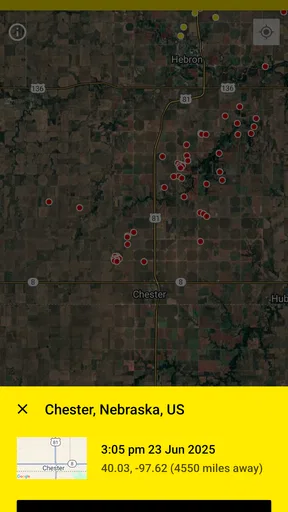
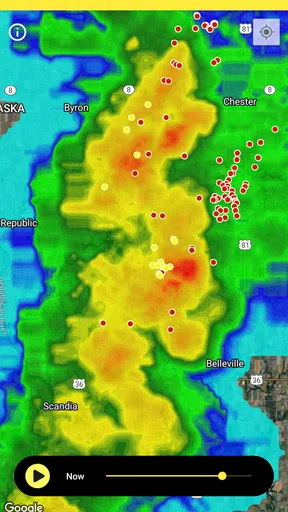
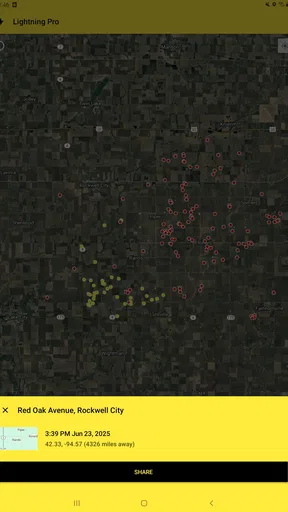
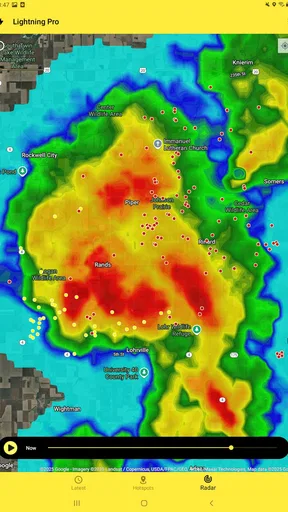
Upon downloading My Lightning Tracker & Alerts, I was immediately impressed by its sleek, user-friendly interface. Navigating through the app is a breeze—pun intended. The main screen provides a real-time map that pinpoints lightning strikes around the world, which I found both fascinating and a little bit humbling. I mean, who knew there was so much lightning happening at any given moment?
The app doesn’t overwhelm you with information either. It gives you just what you need to know without clutter. The color-coded system for lightning strikes helps you quickly assess the situation—yellow for the last hour, orange for the past 30 minutes, and red for the last 15 minutes. It’s simple, effective, and keeps you in the loop with what’s going on outside.
Features That Stand Out
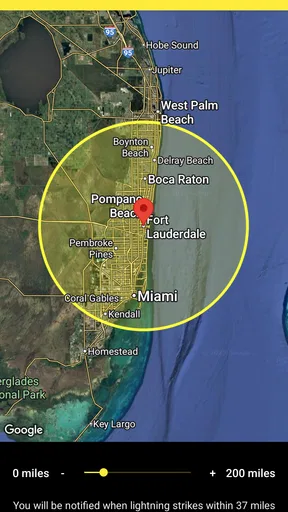
One of the standout features of the app is its customizable notifications. You can set alerts for when lightning is detected within a certain radius of your location. This is particularly handy if you’re planning outdoor activities and want to stay safe. The app’s precision in sending alerts is impressive; I received a notification just minutes before a thunderstorm hit my area. Now, that’s what I call being in the know!
Another feature that caught my attention is the historical data section. You can look back at past lightning strikes, which is not only interesting but useful for planning purposes. Whether you’re curious about the storm patterns or need data for a specific project, this feature has got you covered.
Worth Reading Before You Choose

EA SPORTS FC Mobile 26 Is a Bigger Football Game, but It Takes Time

Flipboard Shows What News Apps Must Do Beyond the Feed

Switching to Android Auto Means Rethinking Your Driving Routine

Google Calendar Makes a Crowded Week Easier to Manage

Ludo King Makes the Most of the Minutes Between Plans

Baby Panda World Brings Quick Play to Modern Phones, but Its Game Library Feels Busy
Making alerts useful without letting them run your day
The most practical way I’d use the alert settings is to match the radius to the plan, rather than leave one setting to cover every situation. A short outing close to home calls for a different level of notice than a day spent at a field or park. Alerts are most valuable when they give me time to reconsider a plan; they are less useful if they are so broad that every distant storm interrupts the day. I’d start conservatively, then adjust after seeing how often nearby activity actually affects the places I go.
For a family afternoon outdoors, I’d check the map before leaving, set a relevant alert, and check again if the sky changes or the notification arrives. For a walk or run, I’d use it as a quick situational check rather than repeatedly watching the screen. The map can help me notice a developing pattern, but I would not treat a quiet view as a guarantee that conditions will stay safe. A lightning tracker answers a specific question about detected activity; it is not a substitute for paying attention to the weather around me.
Historical strike information is useful in a different way. I’d use it to review how storm activity unfolded around a planned outdoor venue or to satisfy curiosity about a past storm, not as a promise about what will happen next time. Looking back can help put a local event in context, but the past map is not a forecast. Keeping that distinction clear makes the feature more helpful and avoids giving historical patterns more certainty than they deserve.
Why You’ll Love It
Let’s talk about the app’s user experience. It’s intuitive. From setting your alert preferences to viewing detailed maps, everything is laid out in a way that makes sense—even if you’re not a tech-savvy person. Plus, there’s something oddly satisfying about watching those little lightning icons pop up on the map. It’s like having a front-row seat to nature’s most electrifying show.
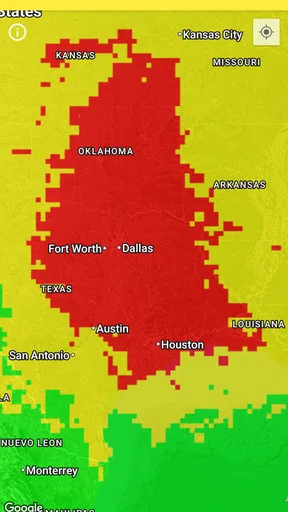
If you’re a weather geek like me, you’ll appreciate the level of detail this app provides. It’s not just about lightning; it’s about understanding the broader weather patterns. The app even allows you to share data with friends, so you can be the go-to weather guru in your circle.
Where it fits beside ordinary weather apps
A general-purpose weather app is usually the better first stop when I need a broad outlook: expected rain, temperature, or the shape of the day. A radar-focused app may be a better choice when I want to follow precipitation across an area. This tracker earns its place when lightning itself is the concern. I like the division of labor: use a forecast for planning, then open this app to inspect strike activity and set a targeted alert when outdoor plans make that detail important.
That distinction matters because a lightning map can look compelling without answering every question a person has about a storm. It can show activity, but I would not infer from it alone exactly how long rain will last, whether a route will remain clear, or what the full local forecast will be. If I’m arranging travel, deciding whether an event can proceed, or trying to understand several weather risks at once, I’d pair it with a broader forecast and local safety guidance instead of expecting this specialized tool to cover everything.
Sharing the map can also make the app more useful in a group. If friends or family are deciding whether to continue an outdoor plan, I can use the same view to explain why I’m suggesting a pause or a change of location. I wouldn’t present a screenshot as a safety clearance, though; it’s a snapshot of activity, not a guarantee about what follows. The best use is practical communication, not replacing judgment with a map.
Room for Growth
While My Lightning Tracker & Alerts is pretty impressive, there’s always room for a little improvement. I noticed that the app sometimes takes a few seconds longer to load the map when there’s a lot of activity. It’s not a deal-breaker, but it’s something to keep in mind if you’re in a hurry. Also, a small suggestion would be the addition of more educational content about lightning and safety tips—because who doesn’t like learning something new?
Another minor gripe is the occasional ad pop-up. While they’re not overly intrusive, an ad-free version would be a nice option for those willing to pay a little extra for a seamless experience.
Who should keep it handy—and who can skip it
I’d put this app on the shortlist for people who regularly plan picnics, outdoor sports, walks, garden work, or other activities where a nearby storm could change the plan. It also suits curious users who enjoy watching weather unfold, and people who want a direct way to follow lightning rather than searching through a crowded forecast screen. The focused map and alerts are particularly worthwhile when checking conditions is part of a routine decision, not just a passing curiosity.
It is less compelling for someone who rarely spends time outdoors or who only wants a simple daily forecast. In that case, a standard weather app is likely to be quicker and more complete for ordinary questions. It may also frustrate someone who expects every map to load instantly or who wants extensive safety education built into the same tool. I’d keep the limitation in perspective: it is a specialist companion, and its value depends on whether lightning activity is information I actually need.
For everyday use, I’d make a habit of checking before heading out rather than waiting until dark clouds are overhead. If an alert appears, I’d use it as a prompt to reassess the plan, look at the conditions around me, and consult a broader forecast where needed. That workflow makes the app useful without turning it into an authority on every weather decision. It also avoids the opposite mistake of treating a map with no recent marks as a reason to ignore changing skies.
The Final Verdict
All in all, My Lightning Tracker & Alerts is a fantastic tool for anyone who wants to stay informed about lightning activity. Whether you’re a storm chaser, a parent planning a day at the park, or just someone who likes to be prepared, this app is worth checking out. It’s engaging, informative, and quite frankly, a lot of fun to use.
So, if you’re ready to take your weather-watching game to the next level, head over to the app store and give this one a try. You might just find yourself checking the app even when the forecast looks clear—after all, you never know when the next lightning strike is going to light up your sky!
Pros
- Real-time lightning strike updates.
- User-friendly interface with clear maps.
- Customizable alert settings.
- Global coverage for tracking lightning.
- Battery-efficient background operation.
Cons
- Ads can be intrusive at times.
- Occasional delay in alert notifications.
- Limited features in free version.
- Requires internet for accurate updates.
- No integration with weather apps.
FAQs for My Lightning Tracker & Alerts
What is My Lightning Tracker & Alerts, and how does it work?
My Lightning Tracker & Alerts is an app designed to provide real-time lightning strike information and alerts. It uses advanced tracking technology to detect lightning activity around the world. Users can view maps with lightning strikes and receive notifications when lightning is detected near their location, ensuring they stay informed about potential weather hazards.
Is My Lightning Tracker & Alerts free to use?
The app offers a free version with basic features such as lightning strike maps and notifications. However, there is a premium version available for purchase which provides additional features like no ads, more detailed statistics, and historical data access. Users can choose the version that best suits their needs.
How accurate are the lightning alerts provided by the app?
My Lightning Tracker & Alerts utilizes data from multiple sources to ensure high accuracy. The app continuously updates its information to provide timely alerts. While it is highly reliable, users should still exercise caution during severe weather conditions and use multiple sources for weather information when necessary.
Can I customize the notifications in My Lightning Tracker & Alerts?
Yes, the app allows users to customize their notification settings. You can adjust the alert radius to receive notifications only for lightning strikes within a specific distance from your location. Additionally, you can set alert tones and choose specific times to receive alerts, helping you manage notifications according to your preferences.
Does My Lightning Tracker & Alerts drain battery life significantly?
The app is designed to minimize battery usage while providing real-time updates. It uses location services and data efficiently to avoid excessive battery drain. However, users who frequently check the app or keep notifications on continuously may experience some battery impact. It's advisable to manage app settings to optimize battery life.


